Restaurant Website Design — Buffalo, NY

Restaurant Website Design in Buffalo That Makes Dining Decisions Easy

Holtz Digital builds custom restaurant websites for Buffalo and Western New York businesses. Each site is designed around the details diners need: a mobile-friendly menu, accurate hours and location, and a clear path to reserve, order, call, or visit.

Mobile-first designHTML menu built inReservation integrationLocal SEO setup

Quick Answer

What should a Buffalo restaurant website include?

A restaurant website should put the current menu, hours, address, directions, and reservation or ordering action within easy reach on a phone. Holtz Digital builds those essentials into a custom site, scopes supported connections to existing platforms, and keeps visible business details aligned with the site's structured data. Projects start at $1,500, with final pricing based on content and integration requirements.

Starting investment
$1,500
Core content
Menu, hours, location, actions
Provider options to assess
Toast, Square, OpenTable, Resy

Cost & Scope

How much does a restaurant website cost in Buffalo?

Restaurant website design starts at $1,500. Choose the scope around how your team works: a brochure site, a site your staff can edit, or a larger project with more involved customer journeys. These are starting prices; the written proposal confirms your pages, editing tools, integrations, and content responsibilities.

Swipe across the table to compare all details.

Published packages and restaurant requirements to discuss before a quote.
Package / starting pricePublished scopeWhat to confirm for your restaurant
BasicFrom $1,500a custom brochure-style siteMenu content, hours, location, and a clear action. Staff editing tools and custom connections are not assumed at this starting price.
StandardFrom $3,000a multi-page business site with CMS setupWhich dishes, prices, hours, and specials staff can edit; content migration and the handoff walkthrough.
PremiumFrom $5,500advanced page strategy, funnels, and a technical SEO passSeparate paths for dining, catering, or events. Provider access and custom integrations still need an agreed scope.

Recurring costs

Hosting, domains, provider subscriptions, payment processing, and licensed software are separate unless your proposal includes them. Maintenance starts at $150/mo. The Professional plan at $300/mo includes content updates (2 hours/month).

Compare maintenance plans

Delivery schedule

Typical projects take 4–8 weeks; simple brochure sites can take 2–3 weeks. Complex builds can take 8–12 weeks. Menu preparation, photos, provider access, and design feedback affect the schedule agreed in your proposal.

Ownership & handoff

Project-specific design and custom code transfer after full payment. Pre-existing Holtz Digital tools and third-party software retain their existing ownership or licenses. We agree account access, staff training, and ongoing responsibilities in your signed agreement.

The Problem

Why most restaurant websites lose customers before they walk in the door

A restaurant site should answer practical questions without making a visitor zoom into a menu, hunt for current hours, or guess how to reserve. Each avoidable step makes the dining decision harder.

Diners need answers on the device in their hand

A restaurant website should make the menu, hours, location, and next action easy to find on a small screen. Slow pages and hard-to-read menus add friction at the exact moment someone is choosing where to eat.

Local search depends on consistent restaurant details

Your website should support the same name, address, phone number, hours, menu, and service details shown on your Google Business Profile. Clear, consistent facts help search engines understand the business.

Hours and location should never be a scavenger hunt

Hours, address, directions, and temporary closures need prominent placement and a dependable update process. Outdated or buried information can send a diner to the wrong place at the wrong time.

PDF-only menus create mobile friction

PDFs can appear in search, but they are often awkward to navigate on a phone and separate menu information from the rest of the site. An HTML menu is easier to scan, update, link, and enrich with dietary details.

Reviews influence where people eat

Real customer reviews can help a first-time visitor judge fit before making a reservation or placing an order. A restaurant site can highlight genuine feedback without inventing ratings or marking up reviews the business does not control.

Your website is the restaurant information you control

Social platforms are useful for discovery and conversation. Your own website is where you control the current menu, hours, ordering links, reservation path, accessibility, and how those details are presented.

Website Capabilities

Everything a restaurant website needs to attract and convert local diners

Our restaurant website design services cover the essentials below. We agree the feature set and editing tools in your proposal so the build matches your service model and budget.

Mobile-First Design

Designed for phones first — where your customers are deciding where to eat. Fast loading, easy navigation, and menu access within one tap from the homepage.

HTML Menu Integration

A mobile-friendly HTML menu with dishes, prices, and dietary details. Staff editing tools are included when specified in the CMS scope.

Hours, Location & Map

Hours and address displayed prominently with a one-tap map link. Structured data mirrors the visible restaurant details so customers and search engines receive consistent information.

Reservation & Order Integration

A supported ordering or booking link, widget, or separately scoped integration for your existing provider. A reservation-request form is an option for teams that confirm requests manually.

Local SEO Setup

Appropriate restaurant schema, Google Business Profile alignment, location-specific content, and metadata that clearly describe the business without promising a particular ranking.

Events & Specials Sections

Sections for specials, happy hour, private dining, and seasonal events. We agree who maintains them and which editing tools are needed.

Menu Planning

An HTML menu, a PDF, or your ordering menu?

Give guests a readable menu before asking them to order. An HTML menu works within the website and can show dish descriptions, prices, and dietary information. Google can index PDFs too; the reason to prefer HTML is easier mobile reading, linking, and maintenance. A downloadable PDF can remain useful for printing.

Website menu
Agree whether staff need to edit individual dishes, prices, categories, and dietary labels. A CMS can provide those controls; a static menu requires a different update process.
Ordering menu
Your ordering provider may maintain a separate catalog. Decide who keeps the two menus consistent. Automatic price and availability syncing is a separate requirement to verify.
Hours & seasonal changes
Name the person responsible for holiday hours, sold-out items, and seasonal menus. Specify which changes staff can make themselves and which need support.

Ordering & Reservations

Connecting Toast, Square, OpenTable, or Resy

The right connection depends on your provider and account. Restaurant website development can range from a clear button to a custom connection. We check supported options and access before quoting the work; naming a platform does not mean every feature is available.

Link to your provider

An Order or Reserve button takes guests to your existing provider page. The provider handles the ordering or booking experience; this does not sync its menu back to your website.

Embed a supported widget

Where your account supports it, a provider widget can display the booking or ordering interface within a page. Its appearance, availability, and subscription requirements remain provider-dependent.

Scope a custom connection

Data syncing or a tailored workflow needs suitable API access, permissions, error handling, and a maintenance plan. We confirm feasibility and price separately before promising a connection.

A reservation-request form is another option for smaller dining rooms. It collects a preferred date, time, and party size for your team to review. A submitted request is not a confirmed table or a live availability check. The guest needs a clear confirmation process.

Restaurant-Specific Features

Built for how Buffalo diners search, decide, and book

The right feature set depends on how the restaurant operates. These options support common dine-in, takeout, catering, event, and gift-card workflows without forcing every business into the same template.

Private Dining & Catering Inquiry

A dedicated inquiry path for private events and catering requests, with the fields your team needs to qualify and respond to each request.

Review Integration

Google review highlights or manual testimonials displayed on the site to build confidence with first-time visitors who don't know you yet.

Click-to-Call & Click-for-Directions

Prominent one-tap phone and directions links on mobile so a visitor does not have to copy an address or search again before acting.

Event Announcements

An events section for live music, trivia nights, holiday reservations, and seasonal menus, with a scoped process for adding and retiring listings.

Fast Image Loading

Food photography is essential but image-heavy sites load slowly. We optimize every photo for fast delivery without sacrificing visual quality.

Gift Card Promotion

A dedicated gift card section that explains the offer and links directly to the platform where customers can purchase it.

See it working

A restaurant site built to this spec

Larkin & Vine is our fictional restaurant demonstration. Explore its HTML menu, sample opening-hours display, and reservation-request interface on your phone. It demonstrates implementation, not client results.

Three things to explore in the restaurant demo

Read a menu on your phone

Browse dish descriptions, prices, and dietary tags without opening a PDF. In the build, dishes are editable WordPress records used by both the visible menu and its structured data.

Explore the sample menu

Check the sample hours

The hours table and open/closed display use the same sample schedule. This demo maintains hours in theme code; a staff editing screen for hours would need to be included in your project scope.

View sample visitor information

Understand the request flow

The demo validates reservation and private-dining forms without storing or emailing submissions. A real deployment needs a working inbox and a staff confirmation process; the demo does not book tables.

Read the build walkthrough

Our Process

How we build a restaurant website around real operations

1

Menu & Content Inventory

We map your menu structure, seasonal items, hours, service offerings (dine-in, takeout, catering, private dining), and any existing reservation or ordering systems you use.

2

Design & Brand Alignment

Mobile-first design that matches the look and feel of your restaurant — whether that's casual, upscale, family-friendly, or craft-focused. No generic restaurant templates.

3

Menu & Content Build

We build your HTML menu, service pages, events section, and all supporting content — structured for both great mobile UX and Google indexability.

4

Local SEO & Integration Setup

Restaurant schema, Google Business Profile alignment, reservation or ordering integration, and a check that the site's core business details are consistent.

5

Launch & Content Training

Mobile and desktop checks, Google Search Console setup, and a walkthrough of the editing tools included in your project. We agree who maintains menus, hours, and specials after launch.

Design Process

From design to working restaurant demonstration

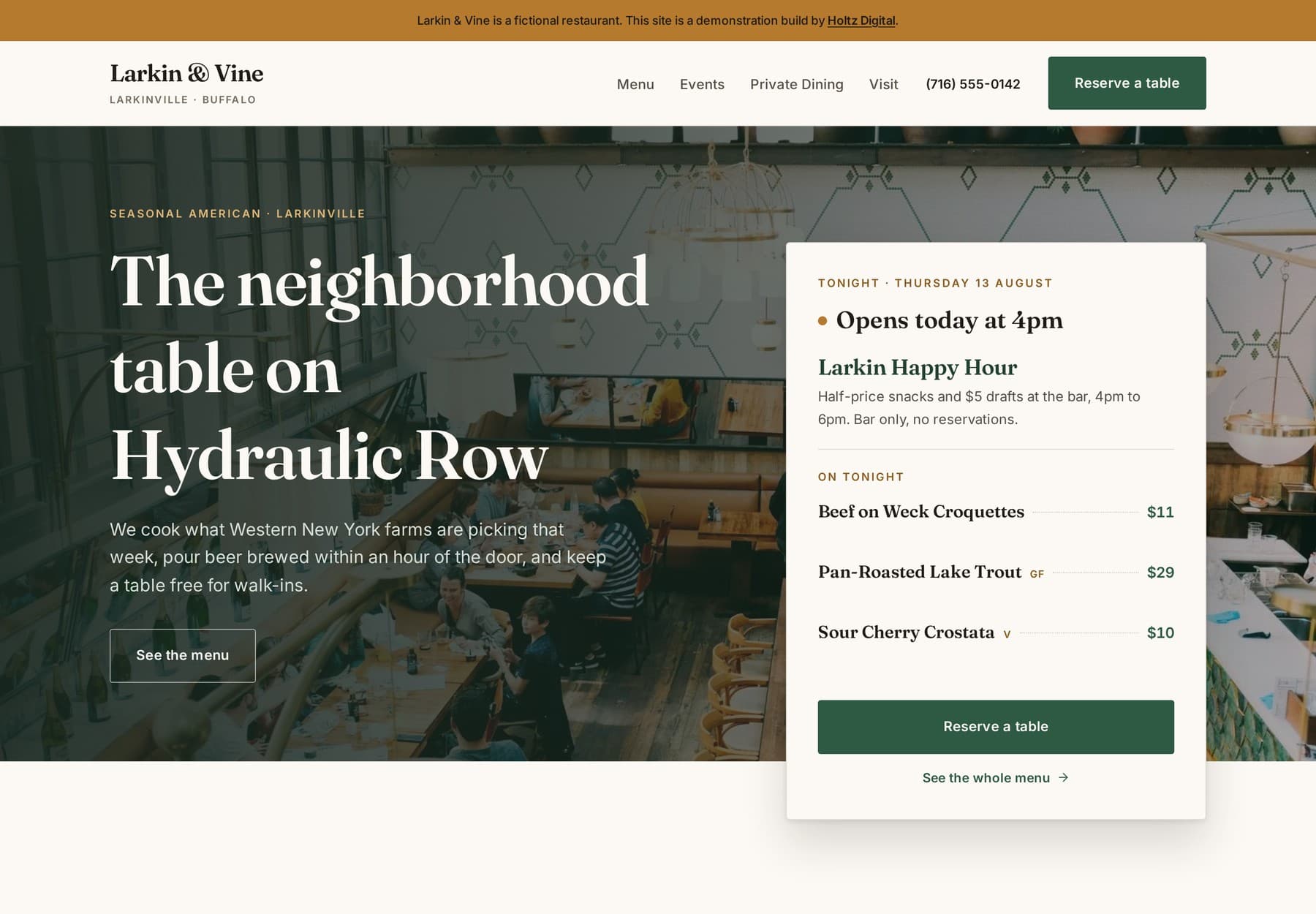
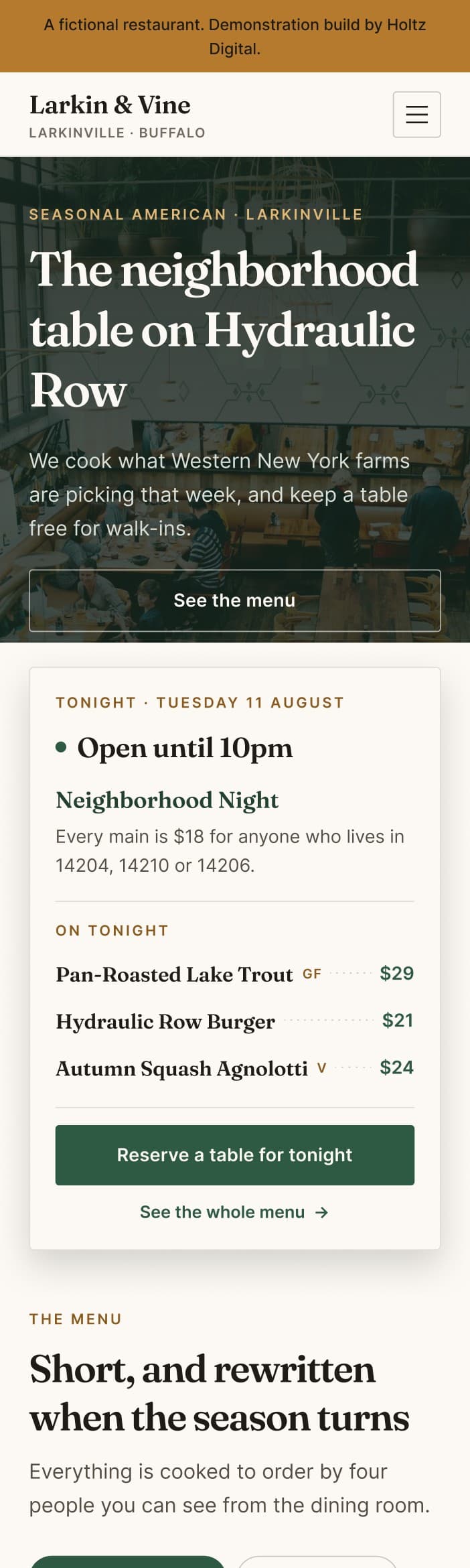
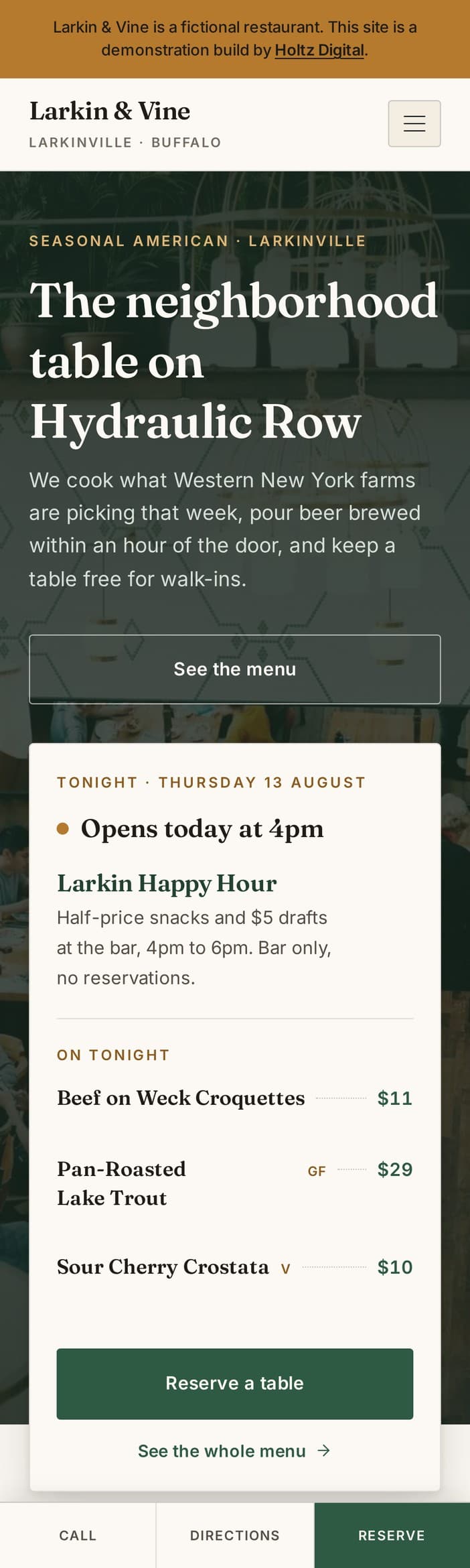
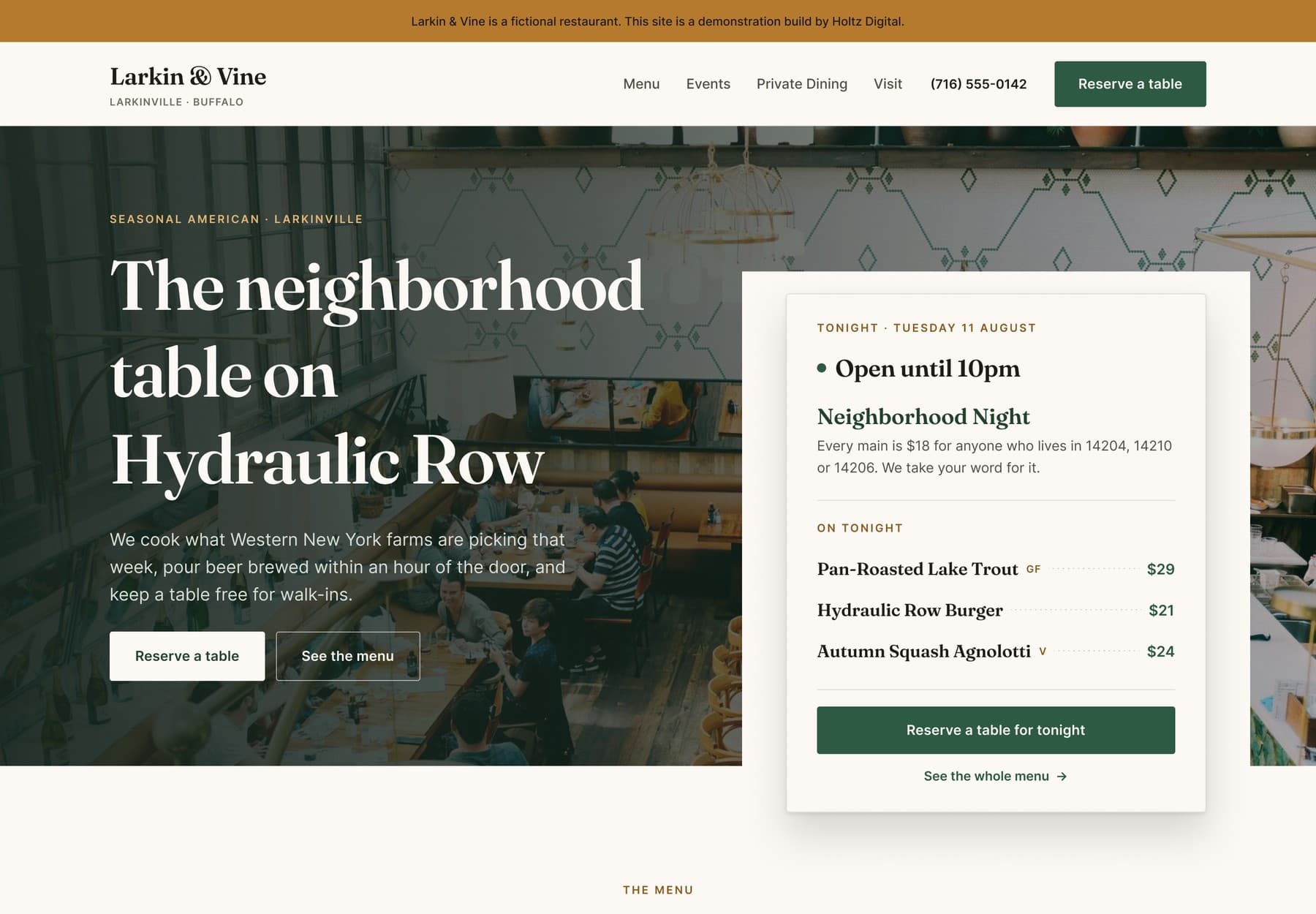
Larkin & Vine is a demonstration restaurant we designed and built end to end. Every page was drawn in Figma at desktop and phone width first, so nothing about the layout was a surprise once the build started. Here is the approved design paired with the site that came out of it.

Desktop — 1440px
Figma — Home / Desktop
Figma design frame of the Larkin & Vine homepage at desktop width, showing the header, hero and the overlapping Tonight panel
The design, approved in Figma.
larkinandvine.preview.holtzdigital.com
The built Larkin & Vine site at desktop width, matching the Figma design with live opening hours and tonight's menu
The site built from it.

Phone — 390px

Figma design
Figma design frame of the Larkin & Vine homepage at phone width
Built site
The built Larkin & Vine site at phone width, matching the Figma design

The layout is what gets approved in Figma — opening hours and menu content are then populated from the restaurant's own data, which is why the panel names a different night in each screenshot. Larkin & Vine is a concept restaurant we designed and built to demonstrate the process, so the disclosure bar sits at the top of every screen.

Who We Serve

Websites for every type of food and dining business in Buffalo

Café & coffee shop website design

Plan around drinks, food, opening hours, and the reason to visit. If you sell beans, gift cards, or preorders, we scope the purchase path and who maintains it.

Food truck website design

Customers need to know where you will be and when. Discuss a staff-managed schedule, mobile menu, ordering link, and a separate catering inquiry path before choosing features.

Bakery website design

Show the daily range separately from custom cakes and catering. An inquiry form can collect the event date, servings, and pickup needs; preorder cutoffs and payment rules need their own scope.

Restaurants, bars & pizza shops

Prioritize the actions that fit your service: dining reservations, current food and drink menus, takeout ordering, or private events. Avoid making every guest follow the same path.

Service Area

Serving restaurants across Buffalo and Western New York

  • Buffalo, NY
  • Amherst, NY
  • Cheektowaga, NY
  • Tonawanda, NY
  • West Seneca, NY
  • Hamburg, NY
  • Orchard Park, NY
  • Clarence, NY
  • Lancaster, NY
  • Depew, NY
  • Lockport, NY
  • Niagara Falls, NY

Frequently Asked

Common questions about restaurant website design

How much does a restaurant website cost?

Holtz Digital restaurant websites start at $1,500 for a custom brochure-style site. Standard starts at $3,000 for a multi-page business site with CMS setup; Premium starts at $5,500 for advanced page strategy, funnels, and a technical SEO pass. Menu editing, migration, and ordering or reservation connections are scoped in the proposal. Hosting, domain registration, provider subscriptions, and payment processing are separate costs unless explicitly included.

How long does restaurant website development take?

A typical Holtz Digital website project takes 4–8 weeks. A simple brochure site can take 2–3 weeks; a complex build can take 8–12 weeks. Menu preparation, photography, provider access, migration, and your review schedule affect delivery. We confirm the schedule after the scope and content responsibilities are agreed.

Can my staff update the menu and opening hours?

Yes, when those editing tools are included in the agreed CMS scope. We identify which menu fields, hours, and specials your staff need to manage and include a walkthrough at handoff. A brochure site does not automatically include a staff editing interface. The Larkin & Vine demo demonstrates editable dishes; its sample opening hours are currently maintained in code.

Who owns the restaurant website after launch?

After full payment, you own the final design and custom code created specifically for your project. Holtz Digital retains its pre-existing tools and reusable components and licenses them for use in the delivered site. Third-party software and media keep their own licenses. Your signed agreement confirms account access, deliverables, and support responsibilities.

Does my restaurant need its own website or can I just use social media?

Both can help, but they serve different jobs. Your website gives diners one reliable place to find your current menu, hours, location, reservation link, and ordering options. Social profiles help with awareness and conversation, but you do not control their layout, reach, or platform rules.

Should I have online ordering on my restaurant website?

It depends on your service model. Restaurants offering takeout or delivery usually need a prominent ordering link or integration. Dine-in restaurants may benefit more from reservations, directions, and click-to-call. Holtz Digital can connect the website to an existing provider such as Toast, Square, DoorDash, OpenTable, or Resy.

How can a restaurant website support local search visibility?

Keep the restaurant name, address, phone number, hours, menu, and service options accurate and easy to read. The website should support the same facts shown on the Google Business Profile, use appropriate structured data, and provide crawlable HTML content rather than relying only on images or social profiles.

How should I show my restaurant menu on my website?

Use an HTML menu built directly into the website whenever practical. It is easier to read and navigate on phones, can include dietary details and links, and can be updated without replacing a separate design file. A downloadable PDF can still be offered as a secondary option when customers need one.

Can my restaurant website handle reservations?

Yes. Holtz Digital can link to or integrate an existing platform such as OpenTable, Resy, or Yelp Reservations. Smaller operations can use a clearly scoped reservation-request form, provided the restaurant has a dependable process for confirming each request.

Can you connect my website to Toast, Square, OpenTable, or Resy?

We review the supported options for your existing account. A direct link sends guests to the provider's ordering or booking page. An embedded widget displays a provider-supported interface on your site. A custom connection requires suitable API access and a separate scope. A connection does not automatically include menu syncing, payment processing, or a provider subscription.

How often should I update my restaurant website?

Update the site whenever the menu, prices, hours, location details, reservation process, or ordering options change. Seasonal specials and events should also be removed or replaced when they end so diners do not act on outdated information.

What is the most important part of a restaurant website?

The site should make the next dining decision easy. On a phone, a visitor should be able to find the current menu, hours, location, and the correct reservation or ordering action without searching through multiple pages.

Related Services

More ways Holtz Digital helps Buffalo restaurants grow

Ready to make your restaurant easier to choose online?

Let's build a fast, mobile-first restaurant website that presents your menu clearly and gives Buffalo diners a direct path to reserve, order, call, or visit.